

How I Build Multi-Tenant AI Agent SaaS With Next.js, NestJS and Stripe
- By Md. Emamul Mursalin
- Updated
- 11 min read
A multi-tenant AI agent SaaS is a normal SaaS with three extra hard problems: every LLM call must be scoped to a tenant, every tenant must have a token budget you can enforce, and your Stripe bill must reflect what each tenant actually consumed. As a multi-tenant AI SaaS developer working in Next.js and NestJS, I have shipped this pattern several times, most recently for a multi-tenant AI voice coaching platform and a multi-model content SaaS. I am Md. Emamul Mursalin, based in Rajshahi, Bangladesh, and this is the architecture I reuse.
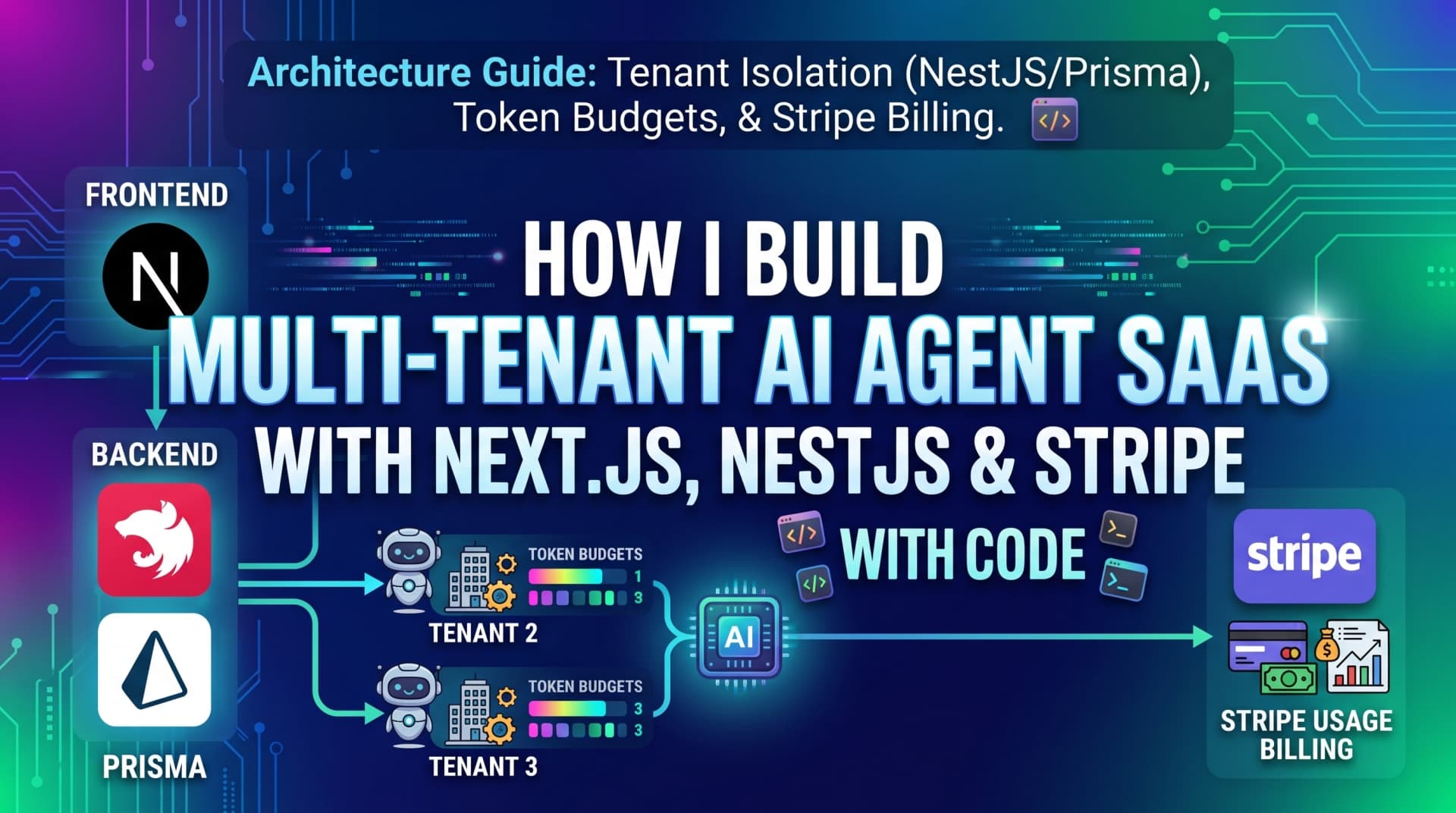
The shape of the system
Every AI agent SaaS I build has the same four layers, and I keep them separate on purpose.
Layer | Technology | Responsibility |
|---|---|---|
Web app | Next.js (App Router, React Server Components) | Auth UI, dashboard, streaming chat, billing portal |
API | NestJS with Prisma on PostgreSQL | Tenant resolution, guards, agent orchestration, usage metering |
Agent runtime | OpenAI, Claude, or Groq via a thin provider layer; LangGraph where a real graph is needed | Tool calling, retries, guardrails, evals |
Billing | Stripe Billing with subscriptions plus metered usage | Seats, plan limits, overage on tokens or agent runs |
Next.js talks to NestJS over an authenticated REST API; the browser never holds a model provider key. Redis (or Upstash) sits beside NestJS for rate limits and BullMQ job queues, because agent runs can take 30 seconds and should not block an HTTP request. This is the same stack I describe on my Next.js developer page, with the AI runtime bolted on.
Tenant isolation: the part you cannot retrofit
Multi-tenancy is a data-modeling decision first. I use a shared database with a tenantId column on every tenant-owned table, plus PostgreSQL row-level security as a second line of defense. Separate databases per tenant sound safer but make migrations and analytics painful at the scale most startups reach in their first two years.
The rule I enforce in code review: no query touches a tenant-owned table without a tenantId in its where clause. In NestJS, the tenant is resolved once per request from the JWT and attached to the request object by a guard.
// modules/tenants/tenant.guard.ts
@Injectable()
export class TenantGuard implements CanActivate {
  constructor(private readonly prisma: PrismaService) {}

  async canActivate(ctx: ExecutionContext): Promise<boolean> {
    const req = ctx.switchToHttp().getRequest();
    const membership = await this.prisma.membership.findFirst({
      where: { userId: req.user.id, tenantId: req.user.tenantId, deletedAt: null },
      select: {
        role: true,
        tenant: { select: { id: true, plan: true, tokenBudget: true } },
      },
    });
    if (!membership) throw new ForbiddenException('No access to this workspace');
    req.tenant = membership.tenant;
    req.tenantRole = membership.role;
    return true;
  }
}
Every service method then takes tenantId as an explicit argument. I do not rely on a request-scoped Prisma client that "magically" injects the filter, because the magic is exactly what breaks when a background job runs without a request context. For belt and braces, RLS policies on the database reject rows that do not match current_setting('app.tenant_id'), which the Prisma connection sets per transaction.
Agent memory follows the same rule. Conversation history, embeddings in pgvector, and tool results are all tenant-scoped rows. A retrieval query in a RAG-backed agent looks like this:
const chunks = await this.prisma.$queryRaw`
  SELECT id, content, 1 - (embedding <=> ${queryEmbedding}::vector) AS score
  FROM document_chunks
  WHERE tenant_id = ${tenantId} AND deleted_at IS NULL
  ORDER BY embedding <=> ${queryEmbedding}::vector
  LIMIT 8
`;
One tenant's documents leaking into another tenant's answers is the single worst bug an AI SaaS can ship. Scoping retrieval by tenant, not just the final response, is how you prevent it. I go deeper on chunking and pgvector in RAG Over Your Company Data: Cost and Architecture.
The agent runtime: tools, guardrails, evals
The word "agent" gets stretched. In production, most of what I build is a loop: model proposes a tool call, the server executes it with tenant-scoped permissions, the result goes back, repeat until done or until a step limit is hit. I use the provider's native tool calling (OpenAI or Claude) and only reach for LangGraph when the workflow genuinely branches.
Three things I always add before the first customer:
Step and time limits. Ten tool calls or 60 seconds, whichever comes first. Runaway loops are the fastest way to blow a tenant's budget.
Tool permissions per role. A viewer in a tenant cannot trigger a tool that sends email. The
tenantRolefrom the guard flows into the tool registry.An eval set. Twenty to fifty real conversations with expected outcomes, run in CI on every prompt change. Without this, prompt edits are guesswork.
For Virtual Client, a voice coaching platform where each customer organization is a tenant with its own scenarios and rubrics, the eval set is what let me swap the underlying model twice without customers noticing. For Contently AI, a multi-model content SaaS, the provider layer routes each request to OpenAI, Claude, or Groq based on the tenant's plan and the task, which is only safe because every route runs the same evals.
Token budgets and usage metering
Here is the part that separates a demo from a business. Every LLM call goes through one function that:
Checks the tenant's remaining budget in Redis (fast) before the call
Records input tokens, output tokens, model, latency, and cost after the call
Writes a
usage_eventrow in PostgreSQL and increments a Redis counterPushes a Stripe meter event asynchronously via BullMQ
Costs in September 2026 make this manageable: small models like GPT-5.4 Mini ($0.75 per million input tokens, $4.50 output) and Claude Haiku 4.5 ($1 and $5) handle most agent steps, and I reserve the frontier models for the final answer or for tenants on a higher plan. Prompt caching cuts repeated system-prompt cost sharply on both providers. The point of metering is not only billing; it is knowing which tenant, which feature, and which prompt version is spending money.
Stripe: subscriptions plus metered overage
The billing model I recommend for AI agent SaaS is a base subscription with an included allowance, then metered overage. It is what customers understand and it protects you from the one tenant who runs 10,000 agent jobs in a weekend.
Concretely:
Products and prices in Stripe: a recurring price per plan (Starter, Pro, Team) and a metered price for "agent runs" or "1k tokens"
Checkout: Next.js server action creates a Checkout Session with the tenant ID in metadata
Webhooks: NestJS handles
checkout.session.completed,customer.subscription.updated, andinvoice.paid, updating the tenant's plan and resetting the budget. Every handler is idempotent on the Stripe event ID.Meter events: usage is reported to Stripe's Billing Meters in batches from BullMQ, never inline in the request path
Customer portal: upgrades, downgrades, and card changes go through Stripe's hosted portal, which saves a week of UI work
On fees: Stripe's standard US rate in 2026 is 2.9% plus 30 cents per card transaction, and Stripe Billing adds 0.7% of subscription volume for the recurring layer, metering, dunning, and Smart Retries. On a $49 a month plan that is roughly $2, which is fine; the alternative of building your own subscription logic is not.
Next.js: what lives where
On the frontend, I keep the App Router honest about server and client boundaries:
Server Components fetch tenant data through the NestJS API with the httpOnly cookie forwarded, so the dashboard renders with no client waterfall
One Client Component handles the streaming agent conversation, reading from a NestJS SSE endpoint
Middleware resolves the tenant from the subdomain or path and redirects users who are not members
Billing state is read from the API, never from Stripe directly in the browser
Because my own portfolio site runs the same Next.js and NestJS pair, this is not a stack I evaluate on paper. It is the one I maintain daily.
Launch checklist for a multi-tenant AI agent SaaS
Before I call a build done, every item below is true:
Every tenant-owned table has
tenantId, an index on it, and an RLS policyNo service method accepts a query without an explicit tenant scope
Model provider keys live only in the NestJS environment, rotated per deploy
Per-tenant token budget enforced before the call, not after
Agent loops have hard step and time limits
Eval suite runs in CI and blocks merge on regression
Stripe webhooks are idempotent and verified with the signing secret
Usage dashboard shows cost per tenant per day
Rate limits on every public endpoint, stricter on auth and agent routes
Data export and deletion per tenant, because a customer will ask
What it costs and how long it takes
In my experience a production-ready multi-tenant AI agent SaaS with one agent workflow, Stripe billing, and an admin dashboard takes 5-8 weeks. That is the scope of my AI Agent SaaS professional tier at $2,499. Multiple agents, RAG over customer documents, SSO, and usage analytics push it to 10-16 weeks and the $3,999 enterprise tier. Full details are on the AI agent SaaS pricing section.
For comparison, global agency figures for advanced agent builds run $20,000-50,000, and US freelance AI engineers bill $60-150 an hour. I work from Bangladesh at offshore rates with senior output, with a UTC+6 schedule that overlaps US mornings and evenings and the full UK and EU afternoon. Contracts include IP assignment, and payment is by Payoneer or bank wire. I break the numbers down further in How Much Does It Cost to Build an AI Agent in 2026?.
Multi-tenant AI SaaS developer Next.js: why this stack
If you are looking for a multi-tenant AI SaaS developer with Next.js, the architecture above is what you should expect them to describe without prompting: explicit tenant scoping in NestJS and Prisma, tenant-scoped retrieval, a metered LLM gateway with budgets, and Stripe Billing with idempotent webhooks. None of it is exotic. The discipline is in doing all of it before the first paying customer, because every one of these is far more expensive to add afterward.
FAQ
Can I build an AI agent as a SaaS product?
Yes, and it is one of the better SaaS models right now because usage-based billing maps cleanly onto token cost. The requirements beyond a normal SaaS are tenant-scoped data and retrieval, per-tenant token budgets, agent step limits, and evals. Build those from day one and a single agent workflow can be a sellable product in 5-8 weeks.
How do you build a multi-tenant SaaS with NestJS and PostgreSQL?
Use a shared database with a tenantId column on every tenant-owned table, resolve the tenant once per request in a NestJS guard, pass tenantId explicitly into every Prisma query, and add PostgreSQL row-level security as a second barrier. Keep background jobs tenant-aware by passing the ID into the job payload rather than relying on request context.
How much does it cost to build an AI agent for a business?
For a multi-tenant SaaS with one agent workflow, Stripe billing, and a dashboard, I charge $2,499 for a 5-8 week build; enterprise scope with multiple agents and RAG is $3,999. Global agency figures run $20,000-50,000 for comparable advanced agents. Add a monthly model bill that usually starts under $100 and grows with usage.
How long does it take to build an AI agent?
A single production agent with tool calling, guardrails, and evals takes 2-3 weeks inside a larger build. A complete multi-tenant SaaS around it, including auth, billing, and an admin dashboard, takes 5-8 weeks with one senior developer. Timelines stretch mostly on integrations with customer systems, not on the model work itself.
What is the difference between a chatbot and an AI agent?
A chatbot answers within a conversation. An agent takes actions: it calls tools, reads and writes data, and loops until a task is done. That difference is why agents need step limits, tool permissions tied to the user's role, and tenant-scoped execution. Many products only need a chatbot with retrieval; build the agent when there is a real action to take.
Work with me
If you are planning an AI agent SaaS and want it built on this architecture, book a call or start a professional-tier build. You can read more about how I work on the AI agent developer page.
Written by
Md. Emamul Mursalin
Free consultation
Building something like this?
I'm a freelance AI product developer in Rajshahi, Bangladesh, working remotely with clients worldwide. A free 30-minute call is enough to scope it.
Book a free 30-min callKeep reading
Related articles

- Hiring Guides
- 12 min read
Code Audit Cost in 2026: Real Prices From $249 to $20,000 and What Each One Buys
A code audit costs anywhere from $249 to $20,000+ in 2026. Here are published prices from real providers, what drives the number, and how to pick the tier you actually need.
- Developer Tools
- 10 min read
Best VS Code Extensions for NestJS in 2026: 13 That Earn Their Place
The VS Code extensions I actually run on NestJS projects in 2026, with install counts, what each one does, which popular ones are abandoned, and a copy-paste extensions.json.
- Developer Tools
- 11 min read
Nestor: A NestJS VS Code Extension That Puts the Docs and Design Patterns on Hover
Nestor is a free NestJS VS Code extension: 136 pages of official docs on hover, fully offline, plus Gang of Four pattern detection for your own classes. Here is what it does and why I built it.